

You've made the switch to Aligna. That's a big step, and you're already saving time compared to manual scheduling. But here's the thing: most restaurant managers only use about 60% of what Aligna can actually do for them.
This guide is designed to help you unlock the full potential of the app. Whether you're an employer looking to optimize your scheduling workflow or an employee wanting to take control of your availability, we'll walk you through the features that make the biggest difference.
Your investment deserves maximum returns. Let's make that happen.
FOR EMPLOYERS: BUILDING YOUR PERFECT SCHEDULING SYSTEM
Feature #1: Setting Up Service Functions the Right Way
When you first set up Aligna, you might have just assigned basic roles to your team. But the service function feature is actually one of your most powerful tools for creating realistic, workable schedules.
What it means: Service functions are the specific roles your team members can fill (bartender, waiter, cashier, host, kitchen staff, etc.).
How to use it properly:
Create a function for every distinct role in your restaurant, not just generic "front of house" or "back of house"
Assign multiple functions to cross-trained staff (this gives you more scheduling flexibility)
Update functions when someone completes training (keeping this current means better schedule suggestions)
The benefit: When Aligna calculates your ideal shift, it knows exactly who can do what. No more accidentally scheduling someone in a role they can't perform.
Feature #2: Mastering the Strength Level System
This is where Aligna goes from good to exceptional. The strength level system (Expert, Intermediate, Beginner, or however you customize it) tells the app not just who can do a job, but how well they can do it.
The three-level approach that works:
Expert/Can Work Alone: Fully trained, can handle the role independently, can train others
Intermediate/Needs Support: Competent but works best with supervision or alongside an expert
Beginner/Learning: Still in training, should always be scheduled with an expert
Pro tip: Don't be too generous with "expert" ratings. If someone needs backup during rush periods, they're probably "intermediate." This honesty leads to better schedules and prevents understaffing.
The benefit: Aligna won't suggest schedules that leave only beginners working the Friday dinner rush. You'll automatically get balanced teams that can actually handle the workload.
Feature #3: Setting Your FTE Requirements Accurately
Full-time equivalent (FTE) requirements per shift are how you tell Aligna what level of coverage you actually need.
Getting this right:
Track your actual coverage needs for a typical week (not what you wish you could afford, but what you actually need)
Different shifts need different FTE levels (weekend dinner service needs more coverage than Tuesday lunch)
Build in a small buffer for unexpected rushes or absences
Review and adjust monthly based on seasonal changes
Common mistake to avoid: Setting FTE requirements too low to save costs, then manually overriding the schedule every week. This defeats the purpose of automation.
The benefit: When your FTE requirements match reality, Aligna's suggestions become genuinely useful instead of just a starting point.
Feature #4: Using the Preview Feature Before Publishing
The preview feature is your safety net. After Aligna calculates the ideal shift based on availability, service functions, strength levels, and FTE requirements, you get to review everything before it goes live.
What to check during preview:
Are strength levels balanced across shifts? (Each shift should have at least one expert)
Does the distribution feel fair? (No one working every weekend while others never do)
Are there any scheduling patterns that might cause problems? (Same people always closing, back to back closing and opening shifts)
Do total hours match your labor budget?
The power of manual adjustments: You can tweak individual assignments while keeping the rest of Aligna's suggestions. This gives you the speed of automation with the judgment of human oversight.
The benefit: You maintain control while still saving hours compared to building schedules from scratch.
Feature #5: Publishing with Confidence
Once you've reviewed and adjusted, publishing sends the schedule to your team instantly. Everyone gets notified, and the schedule becomes visible in the employee view of the app.
Best practice for publishing:
Publish schedules at least one week in advance (gives employees time to plan their lives)
Stick to a consistent publishing day/time (employees will know when to expect it)
Communicate your publishing schedule to your team (reduces anxiety and last-minute questions)
The benefit: Clear expectations and transparent scheduling builds trust with your team.
FOR EMPLOYEES: TAKING CONTROL OF YOUR WORK LIFE
Feature #1: Setting Your Weekly Availability
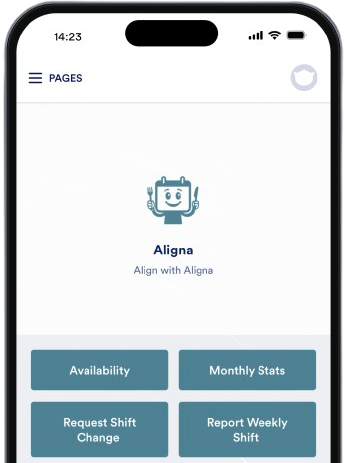
The availability feature is your voice in the scheduling process. Instead of hoping your manager remembers you can't work Tuesdays, you tell the app directly.
How to use it effectively:
Update your availability at the start of each week (or as soon as you know about changes)
Be realistic (if you mark yourself available but frequently ask for changes, it undermines the system)
Block out time you genuinely can't work (appointments, classes, family commitments)
What this does: When your manager builds the schedule, Aligna only suggests shifts during times you've marked available. No more awkward conversations asking to swap a shift you never wanted.
The benefit: You get more control over your work-life balance without being the "difficult" employee.
Feature #2: Tracking Your Current Hours and Earnings
The dashboard shows you exactly how many hours you've worked and how much you've earned so far this month. No more waiting for payday to find out if that extra shift actually made a difference.
Why this matters:
You can see in real-time if you're on track for your target hours
You know exactly what to expect in your next paycheck
You can make informed decisions about picking up or trading shifts
Pro tip: Check this before requesting additional shifts. If you're already approaching overtime, you might want to hold off (or specifically request more hours if you want them).
The benefit: Financial transparency and no surprises at the end of the month.
Feature #3: Setting Your Monthly Hour Target
This feature tells the scheduling system how many hours you want to work each month. It's especially useful for students, parents, or anyone with specific income targets.
How to set it strategically:
Consider your financial needs (rent, bills, savings goals)
Factor in your other commitments (school, family, second job)
Leave a small buffer (if you need exactly 80 hours to make ends meet, request 85-90 to account for potential sick days)
What happens next: When your manager builds schedules, Aligna tries to distribute shifts so everyone gets close to their target hours. People who want more hours get prioritized for available shifts.
The benefit: Your work hours match your life goals, not just what the manager randomly assigns.
Feature #4: Requesting Shift Changes
Life happens. You get sick, your car breaks down, your child's school calls. The shift change request feature lets you handle these situations professionally.
Best practices for shift change requests:
Request as early as possible (last-minute requests are harder to accommodate)
Provide a brief reason (not required, but helps your manager understand it's genuine)
Be reasonable with frequency (occasional requests are fine; constant requests become problematic)
How it works: Your request goes to your manager, who can approve it and find coverage, or work with you to find an alternative solution.
The benefit: You have a professional, documented way to handle life's unpredictability without the stress of texting your manager at 6 AM.
MAKING IT WORK TOGETHER: TIPS FOR THE WHOLE TEAM
The real magic of Aligna happens when both employers and employees use all these features consistently.
For Maximum Effectiveness:
Employers should:
Keep service functions and strength levels updated as staff develop new skills
Review FTE requirements monthly to match seasonal changes
Publish schedules consistently and on time
Respond to shift change requests promptly
Employees should:
Update availability every week before schedule creation
Set realistic monthly hour targets
Track hours regularly to stay informed
Request changes as early as possible when needed
Everyone benefits when:
Schedules are fair and transparent
Last-minute scrambling decreases
Trust builds between management and staff
Everyone spends less time on scheduling logistics and more time on actual work
COMMON MISTAKES TO AVOID
Even with a great tool, there are pitfalls to watch out for:
Mistake #1: Setting It and Forgetting It
Service functions, strength levels, FTE requirements, and availability all change over time. Regular updates keep schedules accurate.
Mistake #2: Ignoring the Suggestions
If you find yourself manually overriding Aligna's suggestions every single week, something's wrong with your setup (probably FTE requirements or strength levels), not the algorithm.
Mistake #3: Not Using Monthly Hour Targets
Employees who skip this feature miss out on more consistent hours that match their needs.
Mistake #4: Publishing Too Late
If you're publishing schedules only 2-3 days in advance, you're not giving your team enough time to plan their lives, even with a great app.
YOUR NEXT STEPS
You're already using Aligna, which means you've moved beyond the chaos of manual scheduling. Now it's about optimization.
This week, try this:
Employers: Review your service function setup and strength level assignments. Are they accurate and up to date?
Employees: Set your monthly hour target if you haven't already, and make sure your availability for next week is current.
This month, focus on:
Building the habit of weekly availability updates
Publishing schedules consistently at the same time
Tracking how manual adjustments decrease as your setup improves
The restaurants and cafés seeing the best results with Aligna aren't necessarily the biggest or most tech-savvy. They're the ones who use all the features intentionally and consistently.
Your time is valuable. Your team's satisfaction matters. And your business deserves scheduling that actually works.
Questions about any of these features? We're here to help you get the most out of Aligna.